Column-level lineage
Column-level lineage (CLL) gives you insight into the provenance of your data products at a more granular level. For each column in a resource (model, source, or snapshot) in a dbt project, dbt provides end-to-end lineage for the data in that column given how it's used.
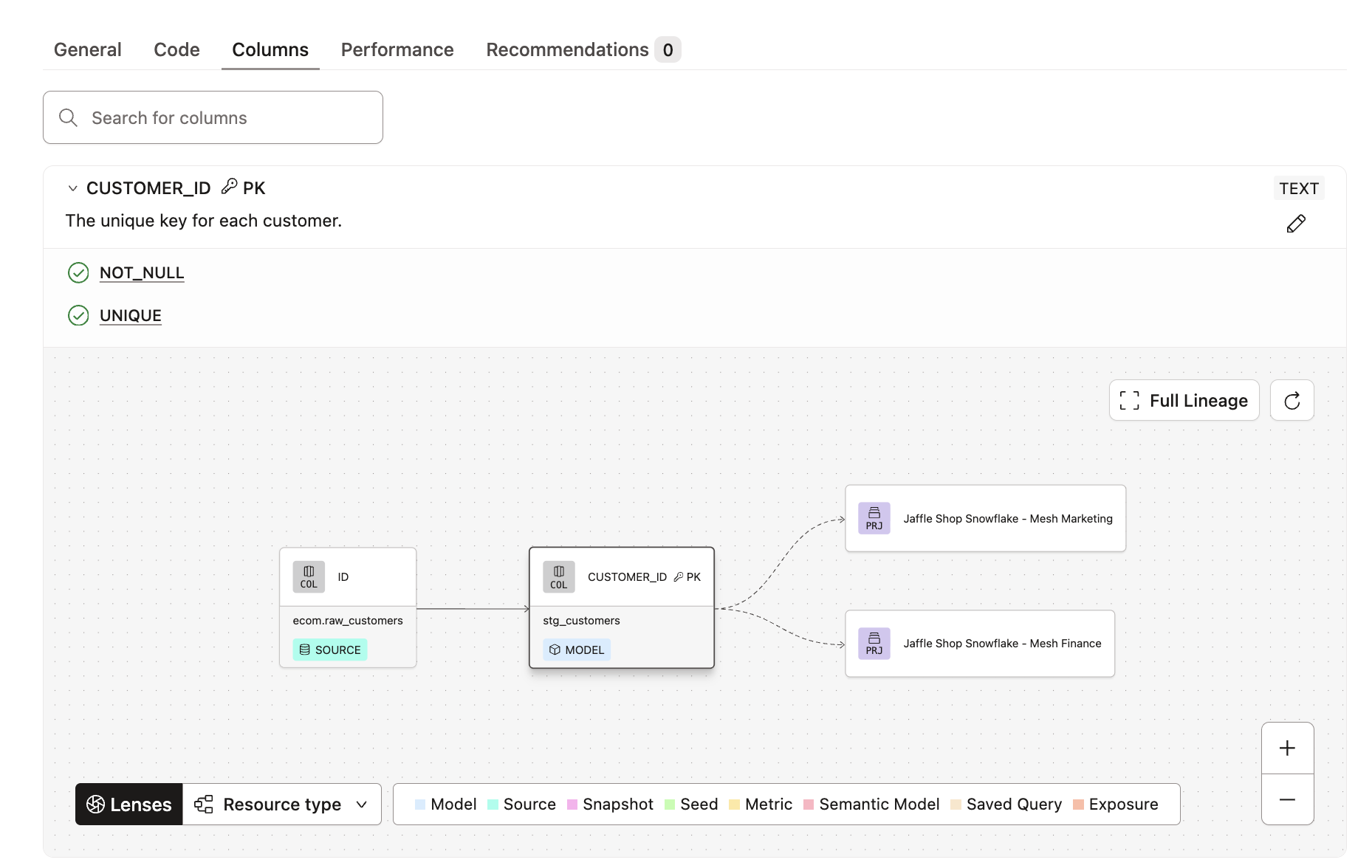 Overview of column level lineage
Prerequisites
You can use CLL in two places:
- Catalog in the dbt platform: Requires an Enterprise or Enterprise+ plan with Catalog access.
- Locally with dbt v2: Requires strict static analysis. Available in the dbt VS Code extension, dbt Docs v2, or from the command line. For more information, refer to dbt Information Schema.
If you enjoy video courses, check out our dbt Catalog on-demand course and learn how to best explore your dbt project(s)!
Access the column-level lineage in Catalog
There is no additional setup required for CLL in Catalog if your account is an Enterprise or Enterprise+ plan with Catalog access. You can access CLL from the column card in the Columns tab in the Catalog resource details page for a model, source, or snapshot.
dbt updates the lineage in Catalog after each run that's executed in the production or staging environment. At least one job in the production or staging environment must run dbt docs generate. Refer to Generating metadata for more details.
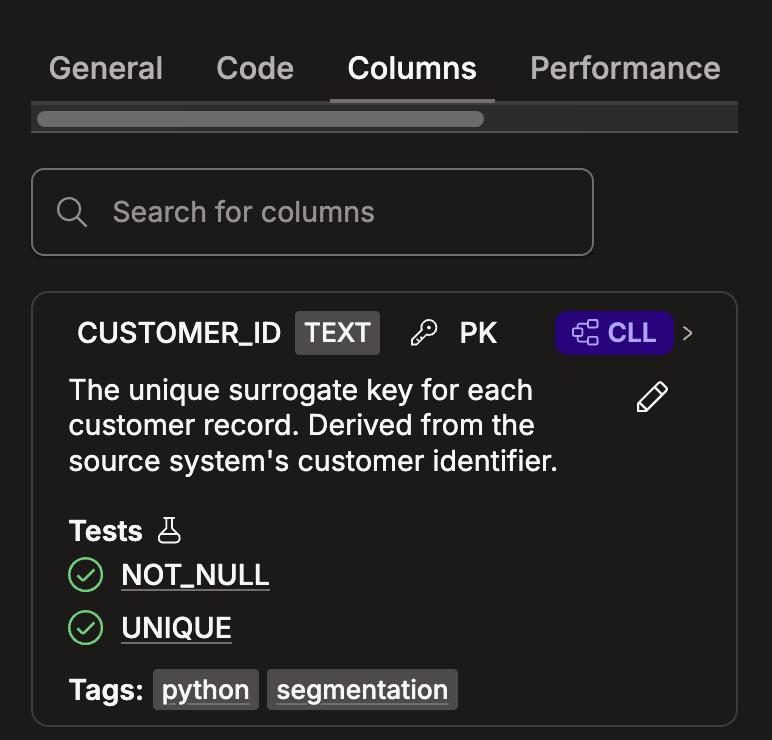 Example of the Columns tab and where to open the CLL
Access column-level lineage locally
When you develop with dbt v2, you can see column-level lineage in these ways:
- dbt VS Code extension: Right-click a filename or a model's SQL, then select dbt: View Lineage → Show column lineage. Refer to Rich lineage in context for the full workflow.
- dbt Docs v2: Run
dbt compile --generate-info-schema --static-analysis strict, thendbt docs generate --no-compile.dbt docs generatehas no--static-analysisflag, so the strict compile must come first or the site won't include column lineage. Refer to dbt Docs v2. - Command line or artifact: Run
dbt compile --generate-info-schema --static-analysis strict, thendbt show --info column_lineage. You can find these files intarget/info_schema/and read thedbt.column_lineageParquet directly.
Column evolution lens
You can use the column evolution lineage lens to determine when a column is transformed vs. reused (passthrough or rename). The lens helps you distinguish when and how a column is actually changed as it flows through your dbt lineage, informing debugging workflows in particular.
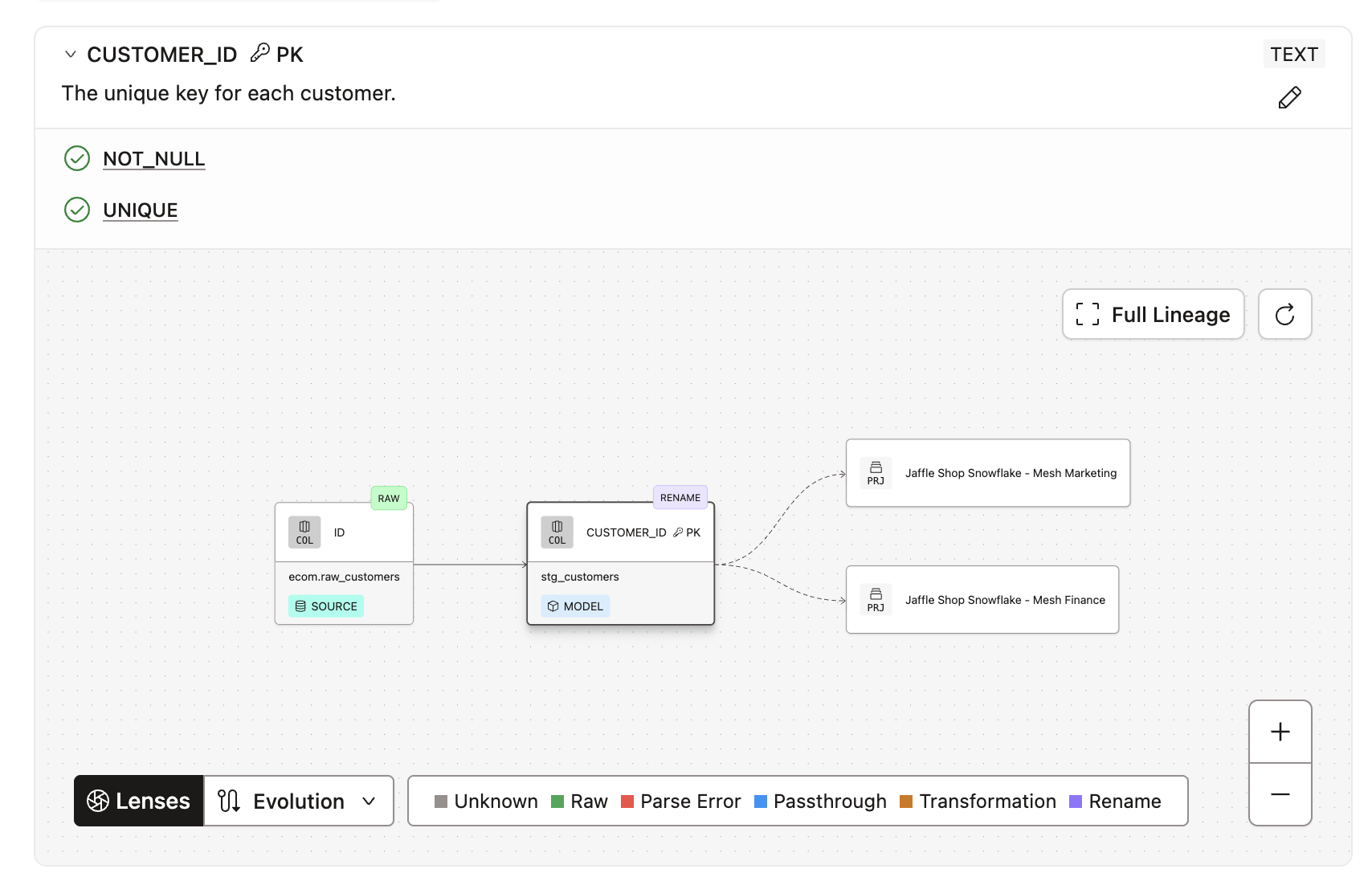 Example of the Column evolution lens
Inherited column descriptions
A reused column, labeled as Passthrough or Rename in the lineage, automatically inherits its description from the source and upstream model columns. The inheritance goes as far back as possible. As long as the column isn't transformed, you don't need to manually define the description; it'll automatically propagate downstream.
Passthrough and rename columns are clearly labeled and color-coded in the lineage.
In the following dim_salesforce_accounts model example (located at the end of the lineage), the description for a column inherited from the stg_salesforce__accounts model (located second to the left) indicates its origin. This helps developers quickly identify the original source of the column, making it easier to know where to make documentation changes.
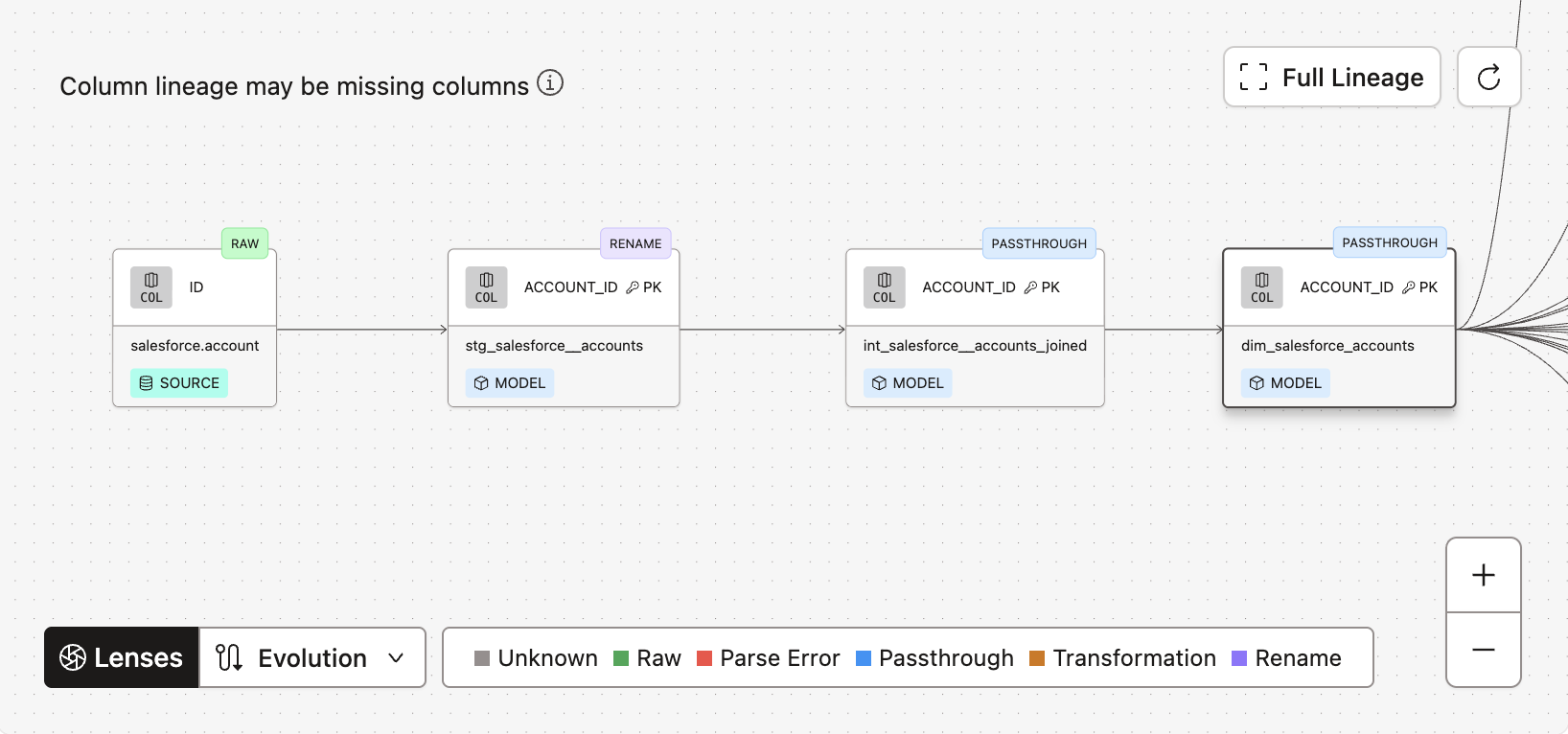 Example of lineage with propagated and inherited column descriptions.
Column-level lineage use cases
Learn more about why and how you can use CLL in the following sections.
Root cause analysis
When there is an unexpected breakage in a data pipeline, column-level lineage can be a valuable tool to understand the exact point where the error occurred in the pipeline. For example, a failing data test on a particular column in your dbt model might've stemmed from an untested column upstream. Using CLL can help quickly identify and fix breakages when they happen.
Impact analysis
During development, analytics engineers can use column-level lineage to understand the full scope of the impact of their proposed changes. This knowledge empowers them to create higher-quality pull requests that require fewer edits, as they can anticipate and preempt issues that would've been unchecked without column-level insights.
Collaboration and efficiency
When exploring your data products, navigating column lineage allows analytics engineers and data analysts to more easily navigate and understand the origin and usage of their data, enabling them to make better decisions with higher confidence.
Caveats in Catalog
Refer to the following CLL caveats or limitations as you navigate Catalog.
Column usage
Column-level lineage reflects the lineage from select statements in your models' SQL code. It doesn't reflect other usage like joins and filters.
SQL parsing
Column-level lineage relies on SQL parsing. Errors can occur when parsing fails or a column's origin is unknown (like with JSON unpacking, lateral joins, and so on). In these cases, lineage may be incomplete and dbt will provide a warning about it in the column lineage.
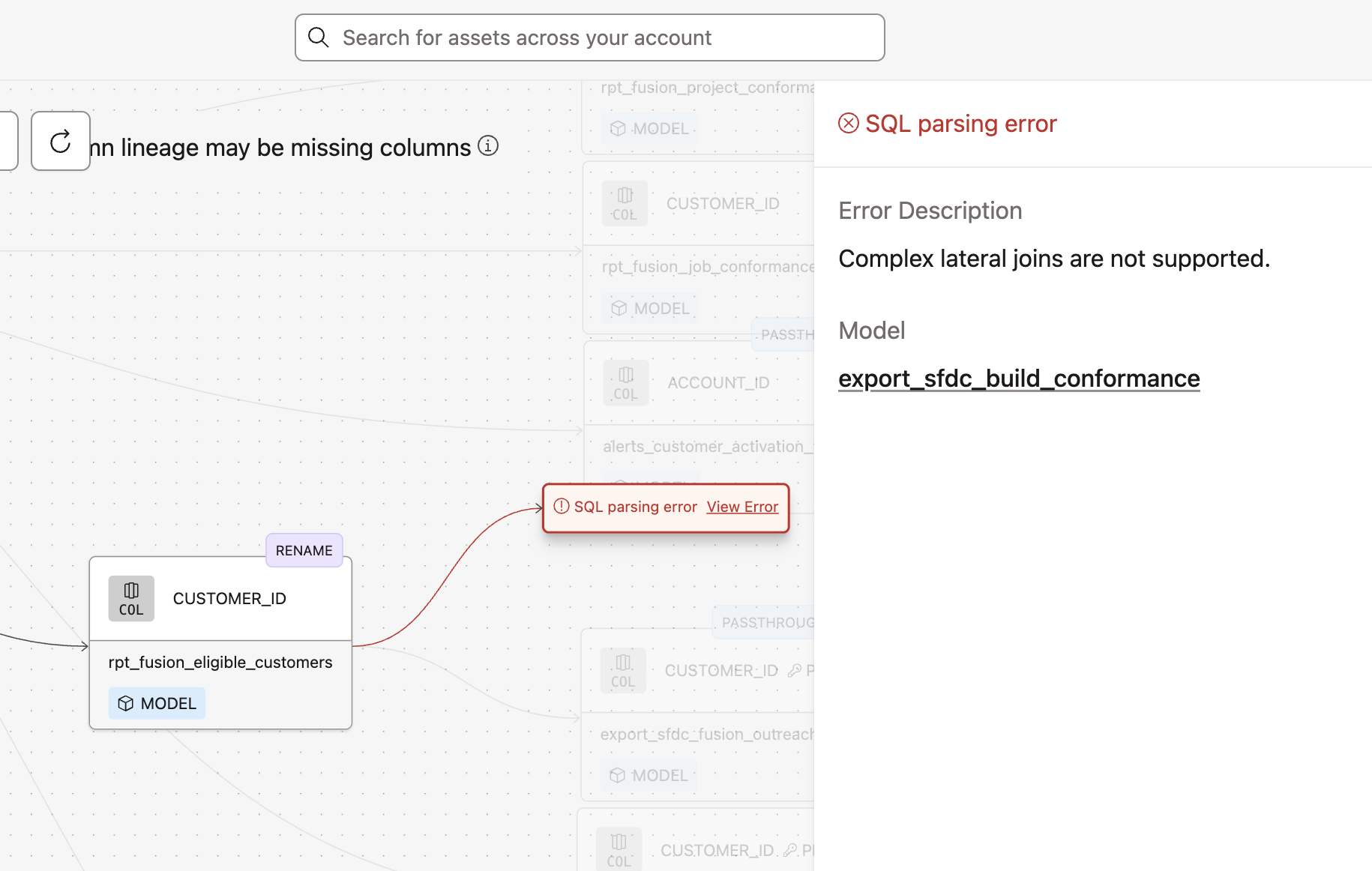 Example of warning in the full lineage graph
To review the error details:
- Click the Expand icon in the upper right corner to open the column's lineage graph
- Select the node to open the column’s details panel
Possible error cases are:
- Parsing error — Error occurs when the SQL is ambiguous or too complex for parsing. An example of ambiguous parsing scenarios are complex lateral joins.
- Python error — Error occurs when a Python model is used within the lineage. Due to the nature of Python models, it's not possible to parse and determine the lineage.
- Unknown error — Error occurs when the lineage can't be determined for an unknown reason. An example of this would be if a dbt best practice is not being followed, like using hardcoded table names instead of
refstatements.
Was this page helpful?
This site is protected by reCAPTCHA and the Google Privacy Policy and Terms of Service apply.